All messages sent through sub-accounts in CoachWorks CRM result in four distinct statuses:
1. Sent:
"The carrier may place sent messages into any of the three statuses below if we do not receive a response from them."
2. Delivered:
The messages which were successfully delivered and sent to the contact.
3. Failed:
Messages that were canceled or not forwarded to the contact by the carrier.
4. Undelivered:
The sent message either raised suspicions or failed to adhere to the messaging policy.
New Feature Implementation for Undelivered Messages:
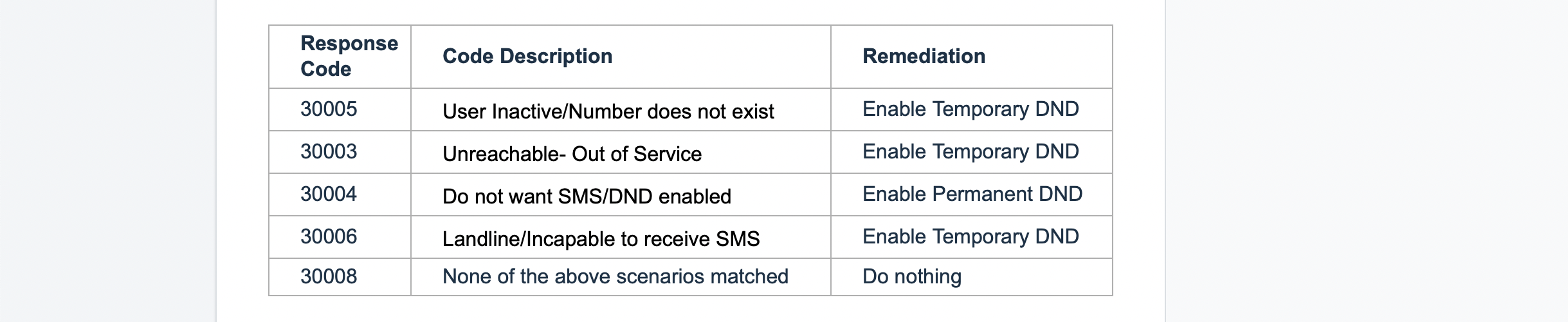
We are implementing a new feature focused solely on handling Undelivered messages. These messages will be identified by specific error codes and stored for each message. This enables the application of Temporary or Permanent DND at a contact level, ensuring new SMS messages are not sent to them, thereby improving your deliverability rate.
Error Codes for Undelivered SMS Messages:
Use the table below to understand error codes for undelivered SMS messages and their corresponding explanations, as well as the remediation measures being taken.
DND (Do Not Disturb) Settings:
Temporary DND:
The agency or location has the authority to cancel the contact-level DND set.
Permanent DND:
Both the agency and the location are unable to revoke the DND status of the contact, either because the contact is unable to receive messages or has chosen to unsubscribe.
Opt-Out Keyword:
Individuals must have the option to withdraw their consent at any given time by responding with a standard opt-out term such as STOP, Unsubscribe, etc. If this action is taken, a permanent DND status will be activated for that particular contact.
By restricting your location from sending SMS to non-relevant contacts, the deliverability rate will increase, and the likelihood of being blocked will decrease. Only contacts who have opted in will receive messages.
Spam Messaging Error Screens:
Conversation:
SMS messages cannot be sent while the DND status is active.

Bulk Action:
Any SMS sent through functionalities, including workflow and bulk SMS, will automatically exclude contacts marked with DND from the sender list.
To Disable Temporary DND:
Navigate to the contact information and uncheck the DND flag. Below is a sample screen for reference.

To Cancel Permanent DND:
Permanent DND cannot be revoked through the UI. Instead, request the contact to send a reply with the keywords "START," "YES," or "UNSTOP" to the number. This process will automatically remove the DND status from the contact.
In the event that incoming/outgoing messages are still failing despite the START keyword not revoking the DND, please open a support ticket.
By following these steps, you can effectively manage spam messages and ensure compliance with opt-out requests within CoachWorks Marketing CRM, thereby enhancing your message deliverability and maintaining positive communication with your contacts.
